Documentation › Look after a site
Add Google Analytics
Add Google Analytics, Tag Manager or another script to every page, decide what waits for the visitor's consent, and check where each one loads.
For people who look after a site. Scripts lists the analytics, tags and widgets the site loads. Adding one changes what every page does, so it waits in Proof like any other change.
Link to this section: Add Google Analytics 4
- Open Scripts in the sidebar and press Add a script.
- Choose Google Analytics 4 (or search — analytics, chat, ads…). The list also has Google Tag Manager, Plausible, Segment, Hotjar, Microsoft Clarity, Meta Pixel, LinkedIn Insight Tag, the HubSpot tracking code, Marketo Munchkin, Intercom, and Custom script for anything else.
- Paste your Measurement ID — it looks like
G-XXXXXXXXXX. Once it's added, Where to find these in Google Analytics 4 links to Google's own instructions.
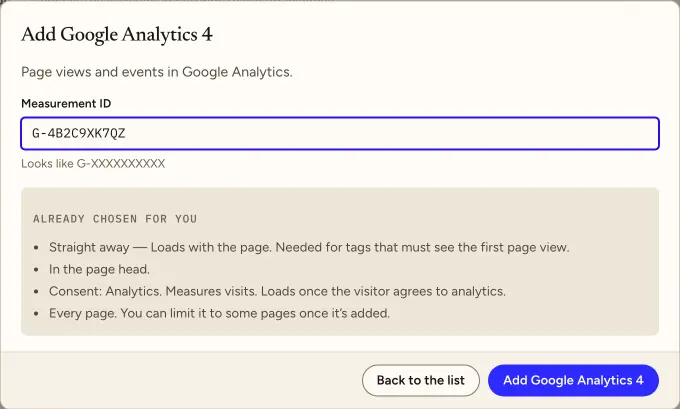
- Already chosen for you says when and where it loads and which consent it waits for. Press Add Google Analytics 4.
- It appears under Installed, switched on. Check it in Proof, then Publish.
Link to this section: Ask visitors first
Consent › Ask visitors first:
- Built-in banner — the site shows a small banner with an accept button, a refuse button and a choices button; you set their words, the title and the text, and the Privacy policy page. Scripts load only after the visitor agrees to their kind: Analytics, Marketing or Preferences.
- Another consent tool — a tool you already use decides; the site listens to it.
- Off — everything switched on loads straight away.
Tell Google tags about consent (Consent Mode) passes the visitor's choice on to Google Analytics and Tag Manager.
Link to this section: Check where it loads
What loads where: type a page address (or choose one) to see which scripts load there and which don't.
A script can be switched off without removing it, moved up or down (the order they load in), or removed.
Link to this section: What can go wrong
- The site has no Scripts screen yet, or it offers "Set it up for me". The site doesn't have Galley's site kit; the button adds it as pending changes for the site's developer to check. Scripts, for developers.
- Analytics shows no visits from the editor. On purpose: scripts don't run in the editor's preview, so your own editing isn't counted.
- No visits at all after publishing. The banner may be waiting for visitors to agree, or the ID is wrong. The docs haven't checked a live Google Analytics property.