Documentation › Look after a site
See who wrote in
Read, search, export and delete what visitors send through the site's forms, get an e-mail when they do, and know when the inbox can receive from the live site.
For people who look after a site. The Inbox keeps what visitors send through forms whose destination is Inbox. Submissions are kept by this app, not published with the site.
Link to this section: Read submissions
- Open Inbox in the sidebar. Its badge is the number of unread submissions.
- Choose a form on the left. Its submissions are in the middle, newest first; choose one to read it in full on the right — every answer with its label, and the page it was sent from.
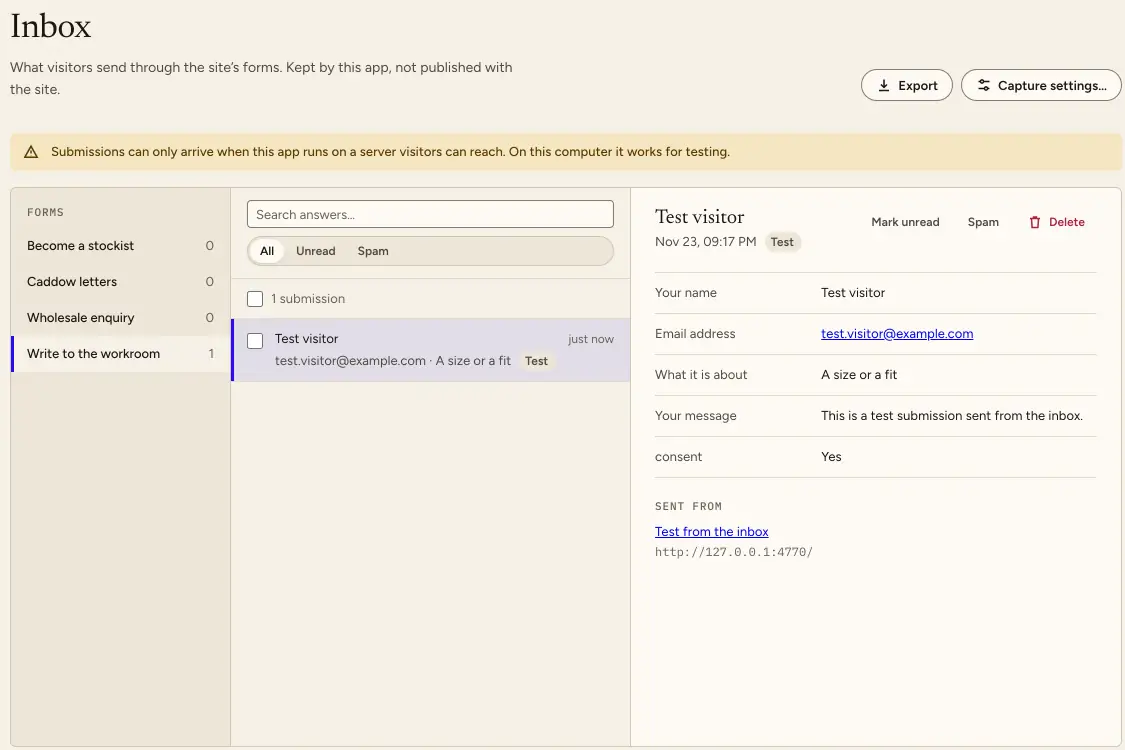
- Search answers… looks through every answer. All, Unread and Spam filter the list.
- Select one or more to Mark unread, move to or from Spam, or Delete.
- Export downloads what's shown as a spreadsheet file (CSV), one column per field.
Opening a submission marks it read.
Link to this section: Try it
Send a test submission, on a form with no submissions yet, sends one through the same path a visitor's does; it is marked Test. Forms in the preview send here too.
Link to this section: Get an e-mail when someone writes
Capture settings… › E-mail alerts: give each form the addresses to tell. The server Galley runs on needs mail settings for this (whoever runs it sets them); until then the window says No mail settings and keeps the addresses for later.
The same window sets Who can send (the site's own addresses), Spam protection, and keys for sending from another server.
Link to this section: On the live site
Visitors' browsers can only reach an inbox that is on the internet. When Galley runs on your own computer, the Inbox says so: Submissions can only arrive when this app runs on a server visitors can reach. On this computer it works for testing. To collect real submissions, either:
- run Galley on a server with a public address (Self-hosting), or
- send the form to your CRM or a webhook instead (Make a form).
Link to this section: Deleting someone's data
Search for their name or e-mail address, select every match (check Spam too) and Delete. It's gone from this app at once; Undo in the message that follows brings it back only for a moment. Copies outside the app — exported files, e-mail alerts, forwarded webhooks, backups — are yours to delete where they are.
Link to this section: What can go wrong
- Spam you wanted. Open Spam, select it, and move it back.
- Nothing arrives from the live site. See On the live site.