Documentation › Edit a site
Ask the assistant
Ask for a change in plain words; the assistant makes it in the same files the form edits, tells you exactly what it changed, and leaves it waiting in Proof.
For people who edit a site. The assistant is quickest for changes that touch many fields — "shorten every heading on this page", "add a team member called Sam" — and for first drafts.
It needs a key: someone adds the site owner's own Anthropic key in App settings › Assistant (or the site's Settings › Connections). Until then the pane says Connect the assistant. and everything else still works.
Link to this section: Ask for a change
- Open the page in the editor. The assistant pane is on the right; the box under it shows Looking at and the page you're on, so "this page" means it. Remove the page with Don't mention this page.
- Type what you want in Ask for a change… and press Enter (Shift+Enter starts a new line). You can attach pictures: images only, up to 6 at a time, 10 MB each.
- While it works, it lists what it reads and edits. Then it says what it changed, quoting the new words, and that the change is waiting in Proof.
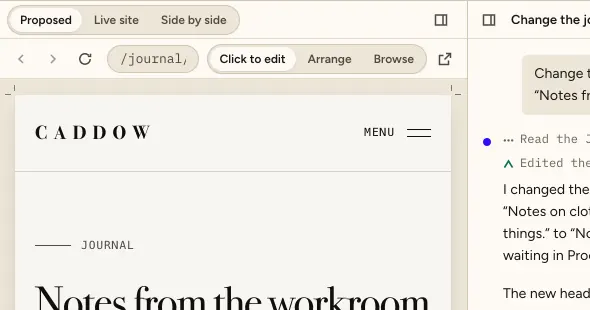
- Review in Proof opens the change; Undo this change (or Undo these 3 changes) puts back exactly what that reply changed.
Nothing it does is live until someone presses Publish. It never publishes.
Link to this section: Content and Build
Under the conversation, Content — "Changes pages, posts and images" — is the usual choice. Build "can also change the site's design and code, and check the build": layouts, styles, new kinds of section. Leave Build to whoever looks after the site; the site's settings can turn it off.
New chat starts a fresh conversation; Chats lists earlier ones for this site.
Link to this section: Good requests
- Say where: "on the Atelier page", "in the footer". It asks one short question when two places could be meant, rather than guessing.
- Say what to keep: "keep the italics", "don't change the prices".
- Give it the facts. It won't invent a figure, a price or a quote; if one is needed and missing, it says so.
Link to this section: What it costs, and what it sends
Each request is billed to the key's owner by Anthropic. App settings › Usage (and Settings › Assistant use for one site) shows what it has cost at list prices. A request sends your words, the page you're looking at, the site's writing guide if it has one, attached pictures, and the parts of the site it reads to do the job. More: Connect the assistant.
Opening the Publish window with a key set also asks the assistant for a one-line note — one small request.
Link to this section: What can go wrong
- "The assistant can't connect: the API key in Settings was rejected." Whoever added the key should add a fresh one in App settings.
- "The assistant's API account is out of credit." The key's owner adds credit with Anthropic, then you try again.
- "The assistant took too long to answer, so I stopped waiting." Try again in a moment, or ask for less at once.
- "This conversation has grown too long for me to keep track of all of it." Press New chat; your changes so far are safe in Proof.
- It says the change isn't available in content mode. The change needs Build; ask the site's developer.
- A reply looks wrong. Press Undo this change under it — or put single changes back in Proof.