Documentation › Look after a site
Move a page without breaking links
Add redirects one at a time or a whole list at once, let the checks catch loops and chains, try any old address, and keep the host's redirect file in step.
For people who look after a site. When a page moves, a redirect sends visitors and search engines from its old address to the new one, so old links, bookmarks and search results keep working. Status: new, in final checks.
Link to this section: Add one
- Open Redirects in the sidebar and press Add one.
- Type the old address (
/about-us/) and the new one (/atelier/, or a full address elsewhere). Choose Permanent for a page that has moved for good — search engines then pass its standing to the new page.
An old address can cover a whole folder: everything under /lookbook/ goes to the same place under /collections/.
Link to this section: Add many at once
- Press Add many and paste a list — two columns from a spreadsheet, a
_redirectsfile,.htaccessor nginx lines, a Cloudflare list — or Choose a file…. - It shows straight away what it understood, and asks about anything it can't decide alone: lines that didn't say permanent or temporary, an old address sent to two places, loops and chains.
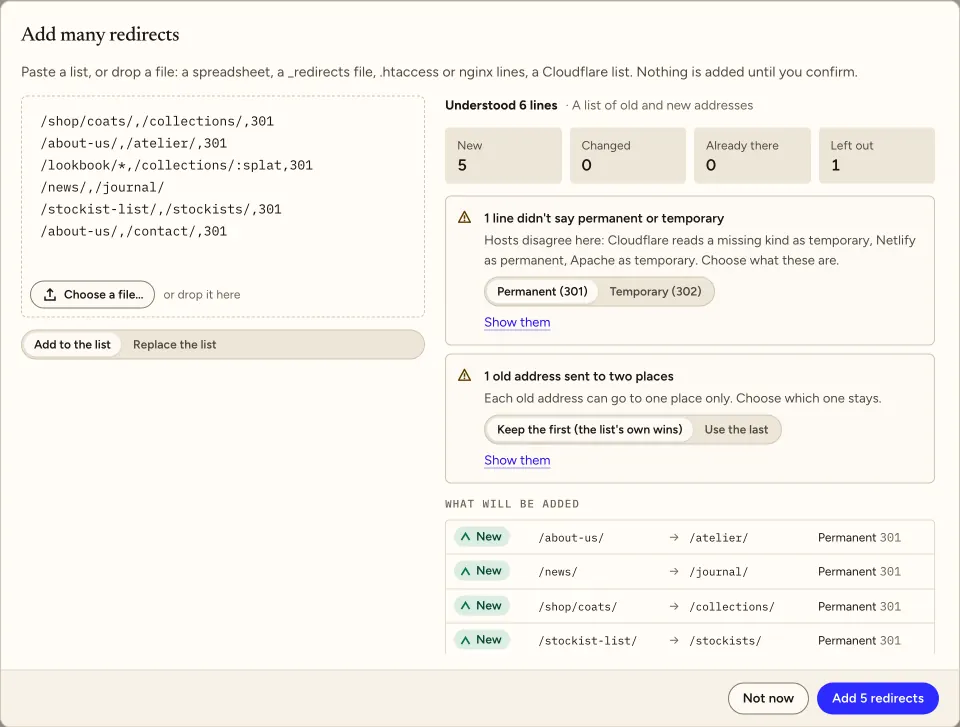
- Press Add 5 redirects (the number is yours). The whole list lands as one change in Proof.
Nothing is guessed: a line that isn't plainly one redirect comes back with its line number and why.
Link to this section: Where they take effect
The first time, the screen asks Where is this site hosted? — Cloudflare, Netlify, Vercel or Another host. Galley then writes the file that host reads and keeps it in step with the list.
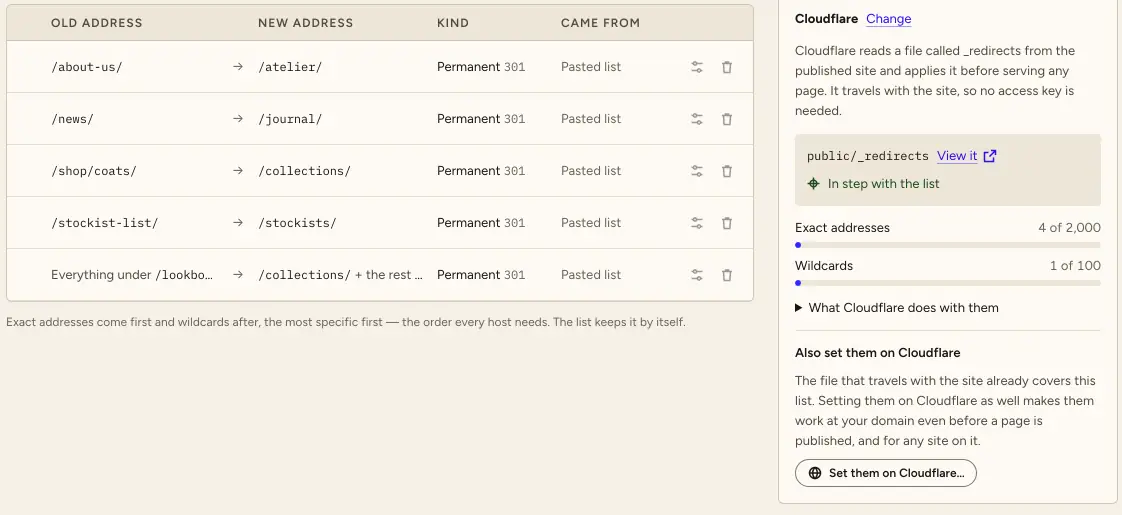
For another host, Download the list in its format. On Cloudflare, Set them on Cloudflare… can also put the list on Cloudflare itself, for more than the file holds; that needs the site's Cloudflare key with two more permissions, and the docs haven't run it against Cloudflare.
Link to this section: Try an address
Type an old address under Try an address and press Try: it shows every step a visitor takes and where they end up — Ends on "The Long Afternoon".
Health lists redirects whose new address has gone, and old addresses the site's own pages still link to.
Link to this section: What can go wrong
- A loop (a → b → a) is refused until you leave it out.
- "Hides a live page." The old address is a page the site still has; redirecting it would make the page unreachable.
- The host's file was edited by hand. Galley never overwrites it silently: the screen offers to replace it with the list, or to bring its redirects into the list.
- Moving from WordPress? The import's list of old addresses is waiting here, under the WordPress import's redirects — Bring a site over from WordPress.